👥 Creating Client Groups
Learn how to group clients based on medical conditions, demographics, or specific needs to facilitate personalized communication and better patient management.
🎯 Why Use Client Groups?
Grouping clients allows you to:
✅ Improve engagement – Send targeted health messages to specific client groups.
✅ Streamline communication – Automate appointment reminders and follow-ups.
✅ Enhance care coordination – Easily track high-priority patients (e.g., chronic disease management).
🎥 Short Video on Creating Client Groups
Watch this video tutorial on how to create and manage client groups in RxKonet:
🛠️ Steps to Create a Client Group
1️⃣ Access Client Groups
- Click on Client Groups from the sidebar menu.
2️⃣ Create a New Group
- Click the "Create Group" button.

3️⃣ Enter Group Details
- Provide a name and description for the group.
- Examples:
📌 Diabetes Patients
- For medication adherence reminders for clients living with diabetes.
📌 Pregnant Clients
- For prenatal health updates and follow-ups for expectant mothers.
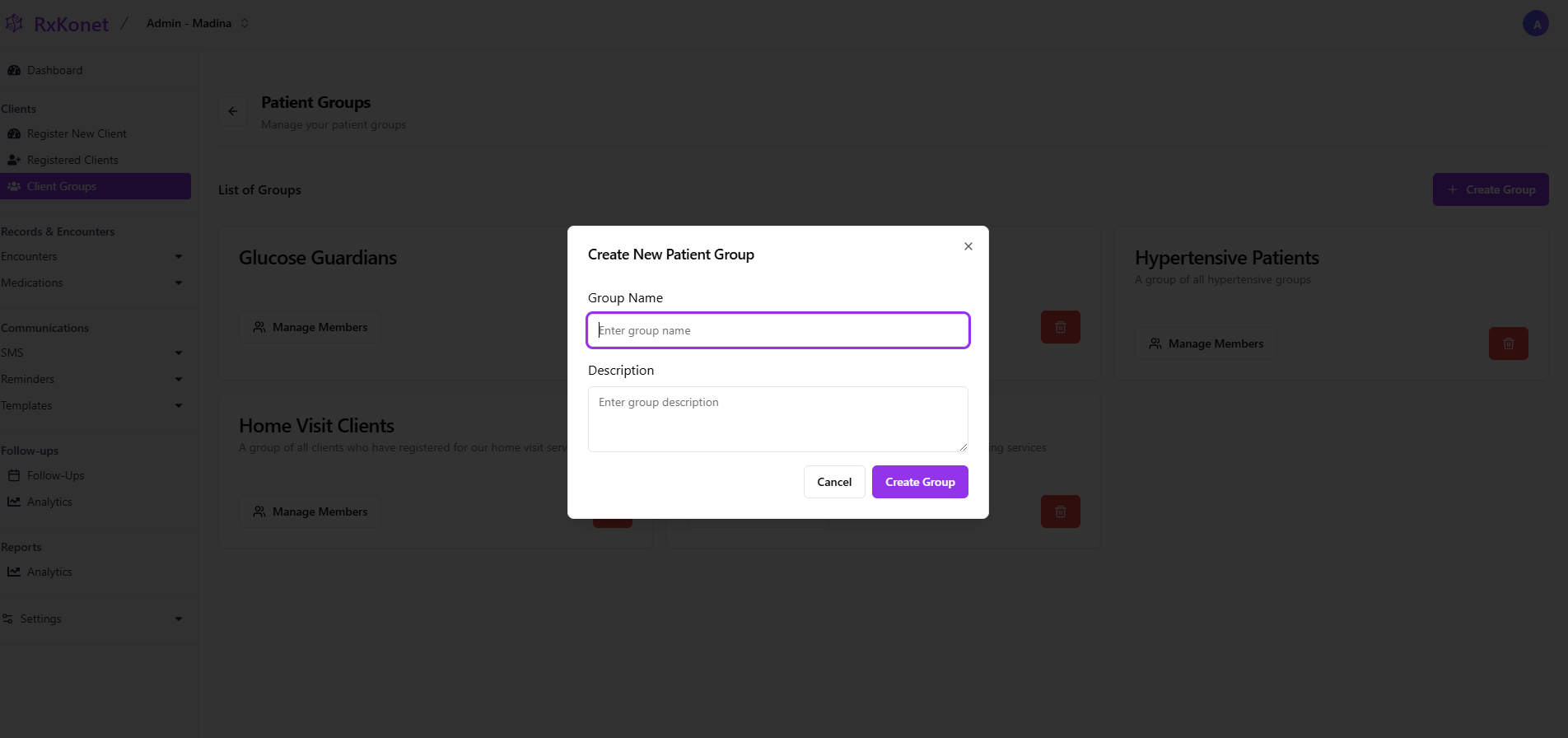
4️⃣ Save the Group
- Click "Create Group" to finalize the setup.
📩 Managing Group Messages
Once client groups are created, you can:
✅ Send bulk SMS reminders to all members of a group.
✅ Automate follow-ups based on group conditions.
✅ Personalize communication by sending condition-specific updates.